Home/The SyltechWeb journal

Useful ideas. Thoughtfully shared.

Notes on website planning, design, development, and the details that make a digital experience feel considered.

Planning

A clearer brief for a better website

A website brief is a shared reference for the people creating your site. It does not have to be long or technical. Its job is to explain the business, the audience, and the change you want the website to make possible.

A useful brief leaves room for design ideas while making the essential requirements clear. Here are the decisions worth putting on paper before the first design conversation.

Start with the business, not the page count

Describe what you offer and who needs it. A legal practice, a specialist online store, and an editorial publication may each need ten pages, but those pages serve very different purposes. A short explanation of the business gives the page list its context.

Then describe the problem. Perhaps visitors cannot tell which service fits their needs. Perhaps product information is scattered across several templates. Perhaps your team needs a simpler way to publish a new page. A concrete problem is more useful than a broad request to make the site modern.

Choose a primary audience and action

A website can serve several groups, but each key page should have a clear priority. Who is likely to arrive there? What do they need to understand? What is the sensible next step?

For a service page, that might be understanding the offer and submitting a project enquiry. For a product page, it might be comparing options and adding the right item to the cart. Naming the action helps guide content, layout, and navigation.

Take stock of your content

List what you already have: approved copy, product data, brand files, photographs, case studies, policies, and design references. Mark each item as ready, needing revision, or still to be created. Also identify who can approve it.

This simple inventory can reveal work that might otherwise appear late in the project. A page design becomes much easier to evaluate when it contains realistic text and the kind of imagery the business can actually supply.

Separate essentials from later ideas

Write down the features needed for launch and the improvements that could follow. Be specific. “Enquiry form with a service selector” is easier to discuss than “lead generation.” “Products imported from a prepared spreadsheet” gives more direction than “store integration.”

Describe existing systems too. Booking tools, mailing platforms, inventory systems, and payment providers can affect the approach. Include what needs to connect, what data should move, and who controls access.

Include practical constraints

Share a budget range, preferred timing, platform preferences, and any fixed dependencies. Explain who will give feedback and who will update the site after launch. If the date is tied to an event, say so; if it is flexible, that is useful too.

References help when you explain the reason behind them. You might like one site’s typography, another site’s product navigation, and the restrained use of color on a third. Those observations are more useful than asking for a copy.

End with the questions still open

A brief is allowed to contain uncertainty. You may need help choosing a CMS, deciding the right page structure, or finding a manageable first release. Put those questions in the document so they become part of the conversation.

The result can be a few well-organized pages or even a concise email. What matters is that the people involved can read it and agree on the problem, priorities, and next decisions.
Design & development

From design file to working website

A design file gives a website its visual direction. Development turns that direction into something people can navigate, read, interact with, and update. The handoff between those stages works best when the design describes behavior as well as appearance.

Whether your starting point is Figma, Photoshop, Canva, or another tool, the same practical questions help turn a static layout into a coherent website.

Provide editable files and usable assets

Share the source files where possible, together with the logos, illustrations, icons, and photographs used in the design. Note which assets are final and which are placeholders. A flattened screenshot can show the direction, but it does not explain every spacing rule or provide every image at the right quality.

Record the fonts and their usage permissions. The same applies to photographs, icons, and template elements: being visible in a design tool does not by itself establish permission to publish them on a website. Keep a simple record of the source and allowed use of each external asset.

Describe the reusable pieces

Look for elements that appear across several pages: headers, buttons, cards, forms, feature sections, and footer links. A consistent set of components makes implementation clearer and helps the finished website feel connected.

Include the variations that matter. A card might have an image on one page and only text on another. A button needs a keyboard focus state as well as its default appearance. A form needs an explanation of success and error states. These are part of the interface, even if they are absent from the main mockup.

Show how the layout changes

A mobile design should express priorities, not just squeeze the desktop layout into a narrow screen. Which content appears first? Does the navigation collapse? What happens to a wide comparison table or a row of product cards?

Provide representative mobile and desktop layouts, then discuss how the space between them should behave. Flexible spacing, sensible image proportions, and readable text are more useful than assuming one fixed width for every visitor.

Try content that does not fit perfectly

Mockups often use titles and paragraphs that happen to fit the available space. Real content will vary. Try a longer service name, a short description, a missing image, and an article with several levels of headings.

This reveals decisions that are easy to settle before development: whether cards align naturally, how images are cropped, which fields are optional, and where a layout needs an editorial guideline rather than a strict character limit.

Plan the editing experience

If the site will use a CMS, decide what the editor should control. Text, images, links, section order, and selected layout variants are common examples. An unlimited number of visual controls can make routine editing harder; a focused set of options can preserve consistency.

For flexible page layouts, label each section clearly and explain its purpose. A content editor should be able to recognize the difference between a service grid, a process section, and a call to action without needing to know how the theme is built.

Agree how the result will be reviewed

Choose a shared reference for approved designs and identify who can resolve questions. During review, compare the website at representative screen sizes and test interactions with a keyboard as well as a pointer.

A careful handoff does not remove every development question. It gives those questions a clear starting point and helps the finished website preserve the intent of the design while working with the content and devices people actually use.

E-commerce

What a useful product page needs

A product page has several jobs. It introduces an item, explains whether it fits the customer’s needs, presents the available choices, and helps someone decide what to do next. A strong visual direction helps, but clarity does much of the practical work.

The right details depend on the product. A ceramic cup, a software subscription, and a replacement component need different information. The goal is to identify the questions a customer must answer before making a decision.

Make the essentials easy to find

Start with an accurate product name, clear imagery, the relevant price, and an understandable description. Explain what the product is and who it is for before leaning on brand language.

Place important options near the buying action. Size, color, quantity, compatibility, and other choices should have visible labels. If a choice changes the price or availability, the page should communicate that change clearly.

Use images that answer questions

A product image can explain shape, texture, scale, or use. Consider what a customer cannot learn from the main image and add supporting views with a purpose. A detail photograph might show a finish; an image in context might make the size easier to judge.

Keep the image treatment consistent across the catalog. Use helpful alternative text for meaningful product imagery, and avoid placing essential specifications only inside an image.

Write details for the decision

Move beyond a list of adjectives. Include measurements, materials, compatibility, contents, care instructions, or setup requirements where they are relevant. Organize longer information with clear headings so customers can scan for the point that matters to them.

Be precise about limitations too. If an accessory is sold separately or an item works only with certain models, state that near the relevant detail. Honest information is more useful than asking the customer to discover an important condition after ordering.

Bring delivery and returns into the journey

Customers often want to understand delivery options, expected dispatch conditions, and the returns policy before they proceed. Use approved, current information and link to the complete policies from a place that is easy to find.

Avoid making a blanket delivery promise if the answer depends on location, stock, or order contents. The design should make room for those differences and point people to the information that applies to their order.

Give the buying action a clear place

The primary action should be easy to recognize without competing with several equally prominent buttons. Show validation near any option the customer needs to select, and make the next state understandable when an item is added to the cart.

On a phone, check that the options are comfortable to use, labels remain readable, and important content is not hidden behind an overlay. Test an unavailable item and an incomplete selection as well as the ideal path.

Treat the page as part of a system

A product page shares information with search, category pages, the cart, and order communications. Product names, prices, options, and images should stay consistent across that journey.

Before launch, review a representative sample of products: a simple item, one with several options, a long description, and an unavailable product. The differences reveal whether the template supports the catalog you actually have. Keep improving it as customer questions show where more clarity is needed.

Selected work

Our latest projects.

A closer look at the websites we design and build.

Explore the portfolio
cmhmovement
Web Development, BigCommerce Store Development

CMH Movement

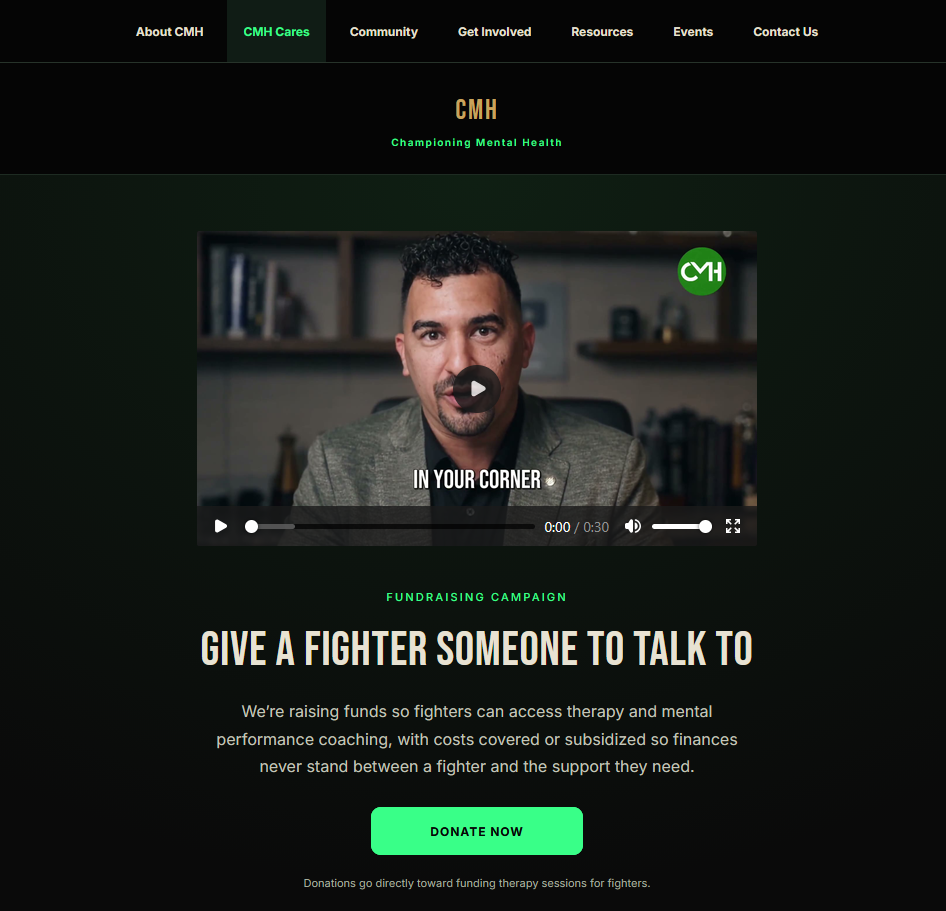
Championing Mental Health is a donation-based nonprofit website that promotes mental health awareness, connects people with support and resources, and encourages community involvement. The…

View project
Dynamic Appearance
Build Custom Template

Dynamic Appearance

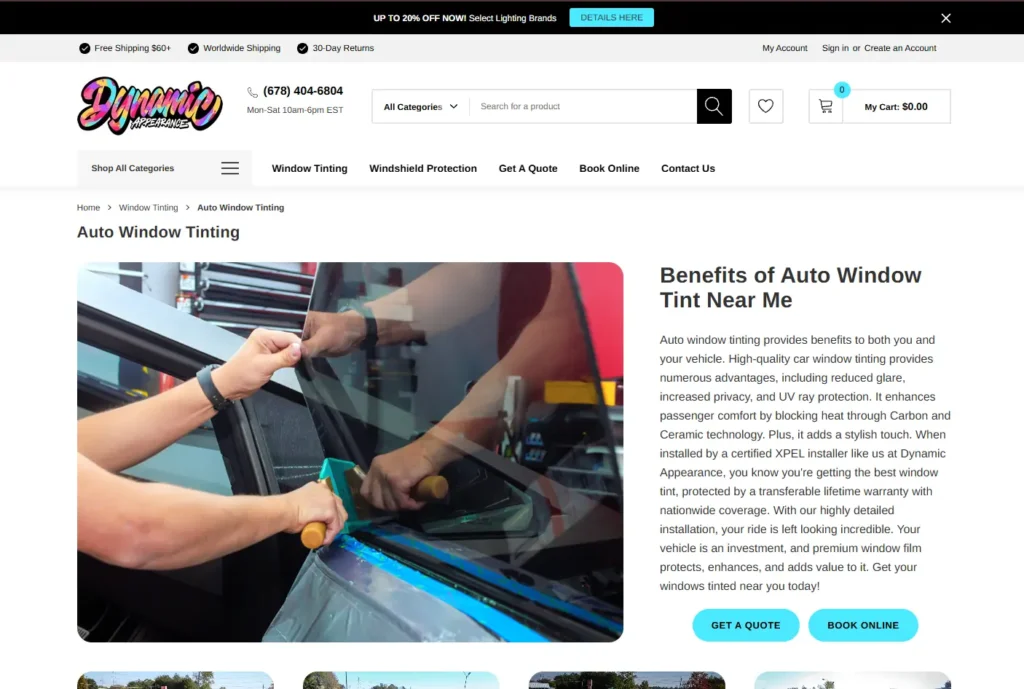
Dynamic Appearance’s Auto Window Tinting is a service page showcasing tinting packages, benefits, and completed installations. It helps customers compare options, explore FAQs, request…

View project
lazlo
Web Development, BigCommerce Store Development

Lazlo Jewellers

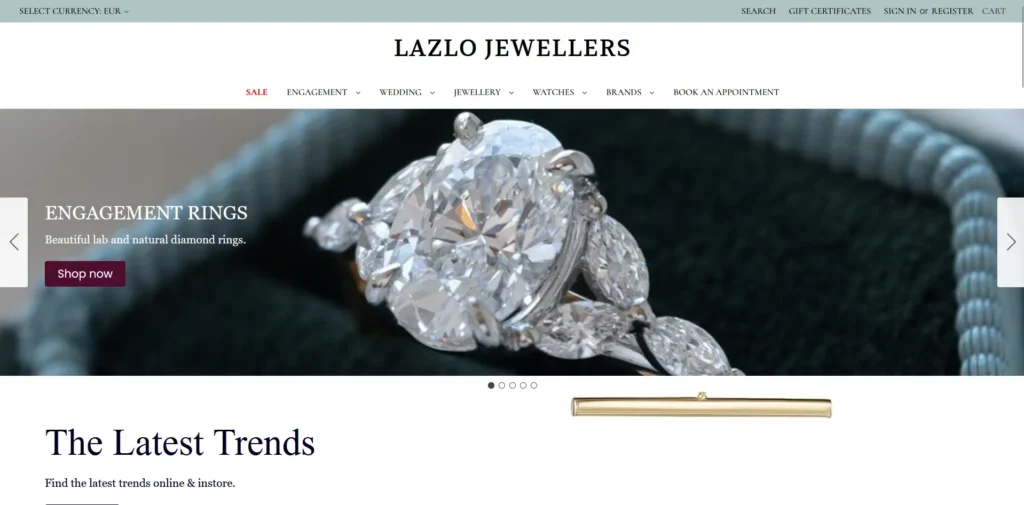
Lazlo Jewellers is an e-commerce website showcasing engagement rings, wedding bands, jewellery, and watches. The project helps customers browse collections, compare products, shop online,…

View project